Aruba Central Online Help

Floorplans Dashboard
The dashboard can be accessed from a site context, or an access point context. You can either navigate to a specific site to view the floor plan, or view a specific site floor plan from the tab in the context.
To view the dashboard from the tab in the context, complete the following steps:
- In the app, set the filter to .
The dashboard context for the filter is displayed. - Under > , the page is displayed.
- Hover over a site to view the following details:
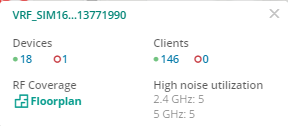
- Click under . The dashboard for the selected site is displayed.
To view the dashboard from a site context, complete the following steps:
- In the app, set the filter to a .
The dashboard context for the selected site is displayed - Under > , click . The dashboard is displayed.
The dashboard allows you to customize the view by selecting various properties and also allows you to select multiple floors in the same site.
To view the dashboard from an access point context, complete the following steps:
- In the app, set the filter to .
The dashboard context for the filter is displayed.
- Under , click > .
A list of access points is displayed in the view - Click the name to view the page. If there are many APs connected to the network, click or to filter the online or offline APs.
- Additionally, enter the access point name in the column and then click the AP name. The AP page is displayed.
- Under > , click . The floor plan details with the highlighted AP is displayed.
- Click anywhere on the floor plan to navigate to the exact floor for a site with the AP highlighted.
The floor plan details for AP is only accessible for the devices that are assigned with license.
